Debian Linux Installation Tutorial and block sites using debian linux
In this tutorial I memamnfaatkan VirtualBox application " Box Maya ", the application is very popular with people who want to learn to install the operating system, server mebuat learn, learn to make network connections, etc. without damaging the real computer system. Each of the stages which will appear exactly the same as if we perform the installation of the real system.
Please note VirtualBox application This requires a computer at least 2 GB of RAM.
Preparation for performing the installation :
1. Application VirtualBox.
2. DVD / CD operating system if we do a real installation , and if we want to learn to take advantage of its installation and application virtualbox iso file to learn the installation of the operating system.
In practice, I use the topology as follows :
Here is how to install Debian Linux Operating system :
Please note VirtualBox application This requires a computer at least 2 GB of RAM.
Preparation for performing the installation :
1. Application VirtualBox.
2. DVD / CD operating system if we do a real installation , and if we want to learn to take advantage of its installation and application virtualbox iso file to learn the installation of the operating system.
In practice, I use the topology as follows :
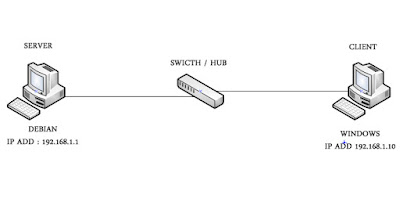 |
| Image by Teknik Informatika |


Comments
Post a Comment